Choose the Perfect Lens Shape for Your Rimless Glasses | LensCollection
Apr 6, 2026
By Rahul Jain
0 comment(s)
New Feature Drop
Choose your perfect lens shape for rimless frames
We've upgraded the Nations Optics lens collection experience — now you can precision-select the exact cutting shape for your rimless frame before ordering. No guesswork, no callbacks.
The Problem We Solved
Rimless glasses are uniquely beautiful — your lenses are the frame. But that also means the cutting shape of the lens matters enormously. A lens cut too wide, too narrow, or in the wrong silhouette can ruin the look entirely.
Until now, customers shopping at Nations Optics had to call in, email us, or simply guess. Not anymore.
What's New
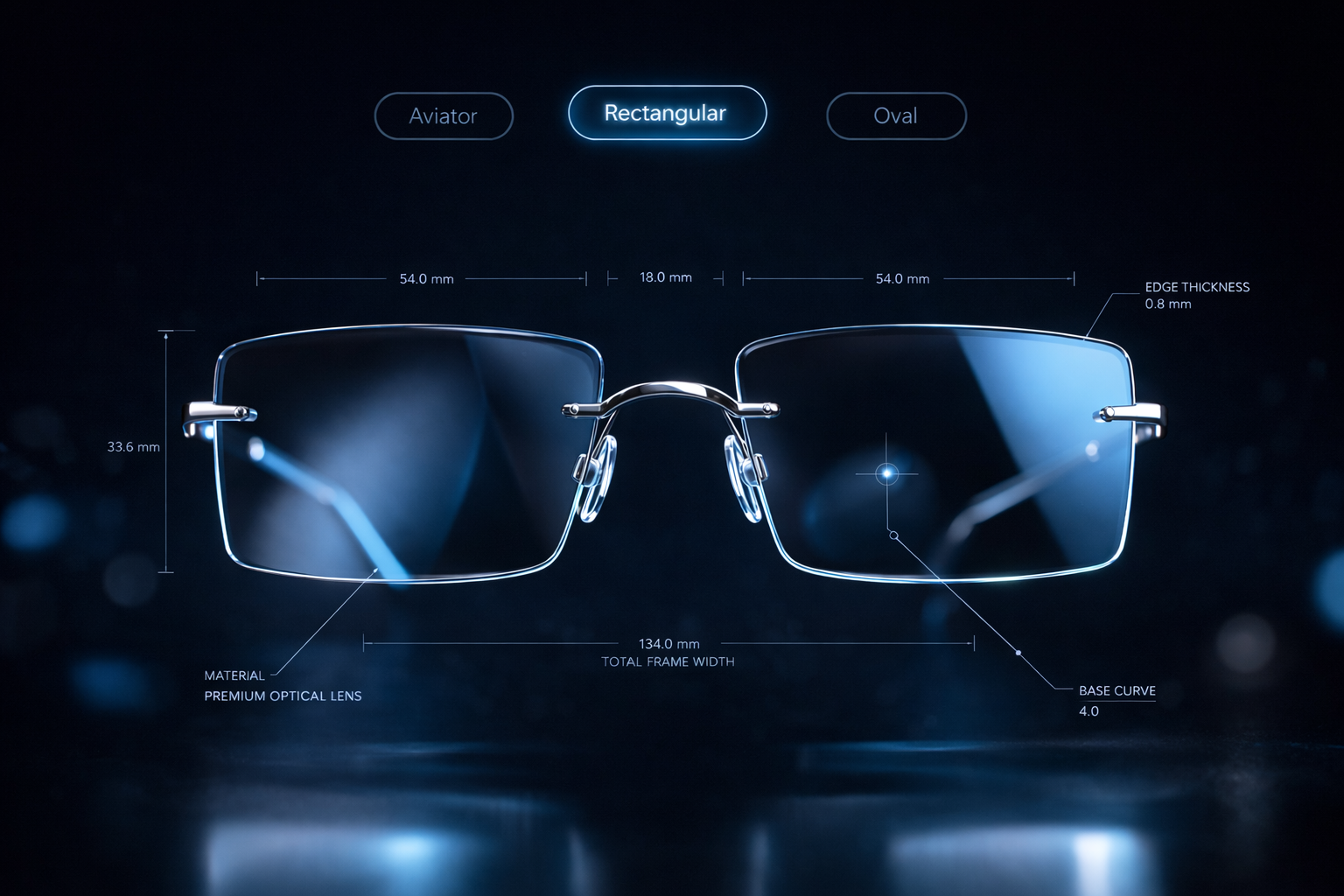
We've added a lens shape selector directly to the Nations Optics lens collection page. When you pick a rimless frame, a sleek modal lets you browse and choose the exact cutting profile — all before adding to cart.
24 shapes available
Aviator, Butterfly, Oval, Square, Rectangular, Rounded Rectangle, Modified Rectangular and more — all in one place.
Filter by gender
Browse All, Women's, or Men's shapes to quickly find styles curated for your frame collection.
Search by name
Know what you want? Type the shape name and jump straight to it — no scrolling through 3 pages needed.
Live image preview
Each shape shows a real photo of the lens cut plus exact dimensions like 52×38mm so you know precisely what you're getting.
Shape Catalogue at a Glance
All available lens cutting shapes
How It Works
Using the lens shape selector is effortless. Here's the exact flow from browsing to checkout:
1
Open the lens collection page
Visit nationsoptics.com/lens-collection and browse lenses as usual. The rimless frame indicator now shows a "Choose Lens Shape" prompt at the top of the product.
2
Browse and filter shapes
Use the All / Women / Men tabs or the search bar to find the right shape. Each card shows a real photo and the exact dimensions (e.g. 54×44mm).
3
Select and confirm
Click a shape card to highlight it, then press "Confirm Selection." Your choice is saved to the order instantly.
4
See your selection on the product page
A small confirmation badge appears right on the product page showing the chosen shape. You can change it anytime before checkout.
Live Feature Preview
After confirming your shape, this widget appears directly on the product page — clear confirmation of what's been applied to your order.
Product page — rimless frame widget
Using these lenses in a Rimless Frame?
Choose a lens cutting shape so we can precision-cut your lenses to fit.
✓ Aviator ✕
Rimless glasses are among the most personal eyewear you can own. Getting the lens shape exactly right isn't optional — it's everything.
Why This Matters
Rimless glasses have zero frame to define the silhouette — the cut of the lens is the design. An aviator cut reads sporty and bold. An oval cut reads soft and classic. A rectangular cut reads sharp and modern. The wrong cut on the right lens can flip the entire aesthetic.
By putting this choice in your hands — with real images and real dimensions, right inside the checkout flow — Nations Optics is making sure every rimless frame you order is exactly what you imagined.
This feature is live now on the optical lenses page. Give it a try and let us know what you think.
Ready to find your shape? Head to the Nations Optics lens collection, pick a rimless frame, and try the new shape selector yourself.
Exclusive Offers
Sitewide
33%
OFF
Flat 33% off on all products
Already applied on every price · no coupon needed
Auto-applied
10%
OFF
On orders ₹1,200 – ₹1,799
No coupon needed · saves automatically
Auto-applied
15%
OFF
On orders ₹1,800 – ₹3,199
No coupon needed · saves automatically
Best Deal 🔥
20%
OFF
On orders above ₹3,200
No coupon needed · saves automatically
Pay Advance
₹50
SAVED
Pay advance amount at checkout
Flat ₹50 off · pay balance on delivery
Pay Full ✓
₹100
SAVED
Pay full amount at checkout
Maximum saving · instant confirmation
N
Nations Optics Assistant
● Online
👋 Hi! I'm your Nations Optics assistant. Ask me anything about lenses, frames, or prescriptions!